I built a TikTok-style feed in DartNative. The native parts held up, the launch did not
Liquid Glass, AirPlay, PiP and a three-second launch
Update: with 30 pages instead of 1,000, the same screen starts in about 0.35 seconds. With 10,000 it never starts: iOS kills it for memory. PageView.builder here is not lazy. The numbers are below.
Eleven days ago I built the same infinite video feed in DartNative and Flutter and spent a whole section on the fact that DartNative had no PageView. I got paging working with 22 lines of Objective-C and two workarounds nobody had written down. On 17 September DartNative shipped PageView, PageController and a pagingEnabled flag on FastList, and its playground gained an infinite video feed demo that looks a lot like mine.
So I went back. This time I did not stop at a feed. I built the screen people actually mean when they say “a video feed”: TikTok’s. Following and For You tabs, a column of Liquid Glass buttons down the right edge, a comments sheet with a real text field, swipe left for the creator’s profile, a floating glass tab bar, pull to refresh, AirPlay, Picture in Picture, audio that keeps playing with the phone locked, and next and previous on the lock screen. Then I put it on a cabled iPhone 16 Pro Max running iOS 27.0, profiled it, and kept the logs.
The short version: every native feature worked, and most of them cost me nothing. The ones that did cost me a 744-line plugin. And the finished screen took three seconds to show its first frame, where the plain feed took half a second.
PageView landed, and the shim is gone
The 22 lines of Objective-C, the safe-area workaround and the manual DynamicLibrary.process() lookup are all deleted. The feed is PageView.builder(scrollDirection: Axis.vertical, ...) and nothing else, and one swipe is one page on the platform’s own paging.
The item ceiling from the last post is still there. It is documented now rather than fixed. The doc comment on PageView in the SDK says an unbounded builder grows “up to a ceiling of about a thousand full-screen pages on a phone, past which the list ends: native paging stops snapping beyond that much content.” The release notes describe the same builder as a feed that “has no end and grows as the reader scrolls.” Those two sentences do not describe the same widget, and only the doc comment matches what I found in September.
I also pulled 10,000 portrait clips from the Pexels API and hard-coded them, because a TikTok clone with 17 videos is a slideshow. They added 3.3MB to the app. The pager has 1,000 pages, so one session never sees more than a thousand of them.
What DartNative gave me for free
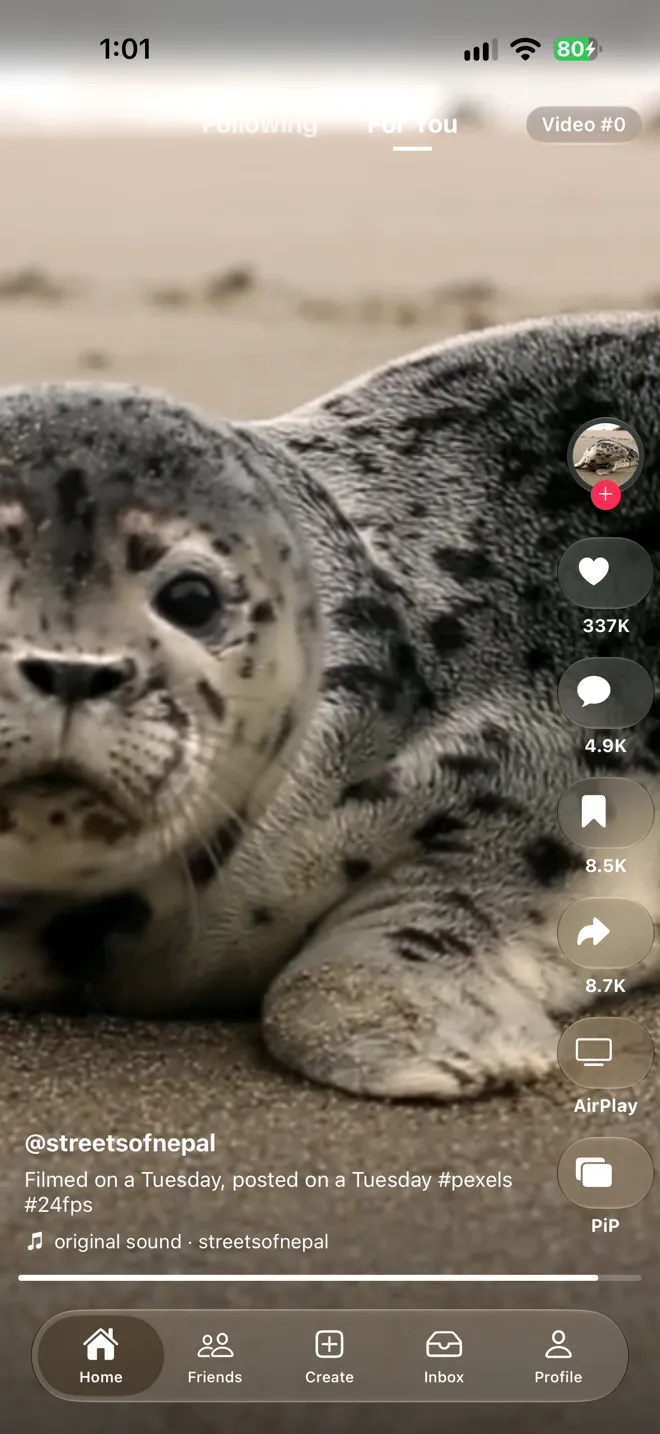
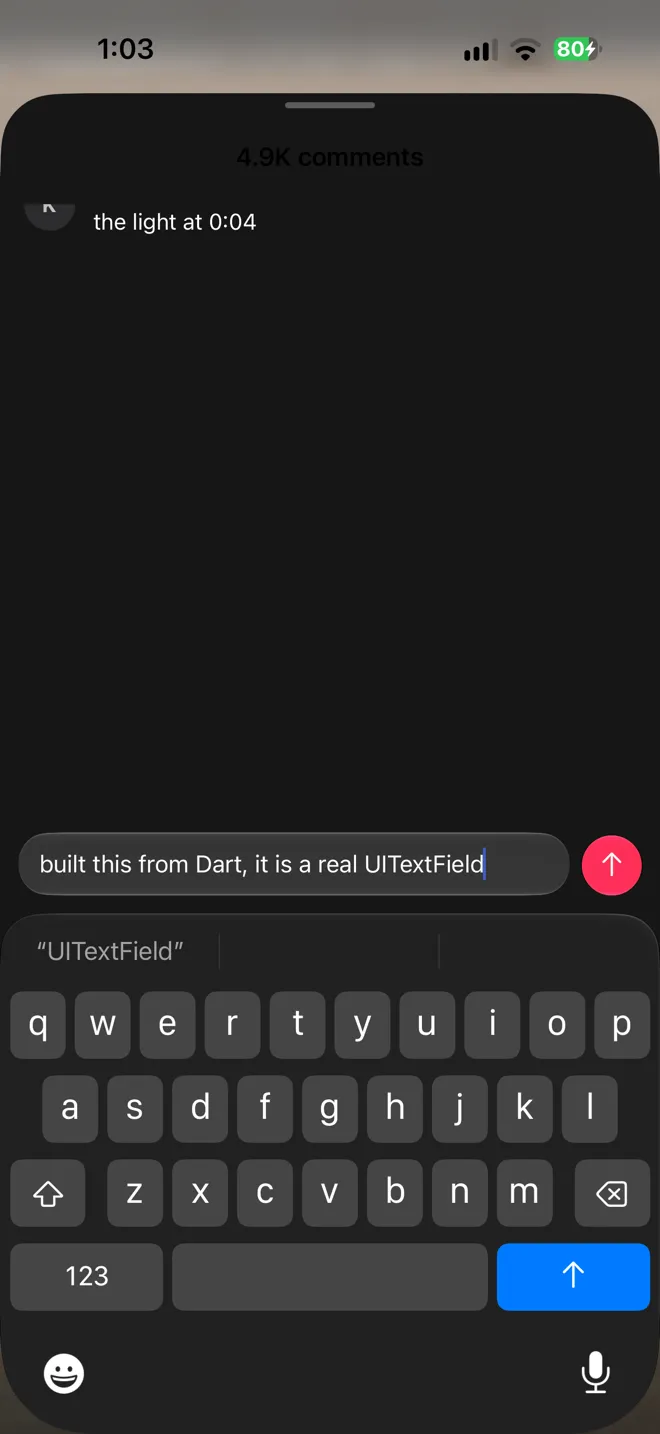
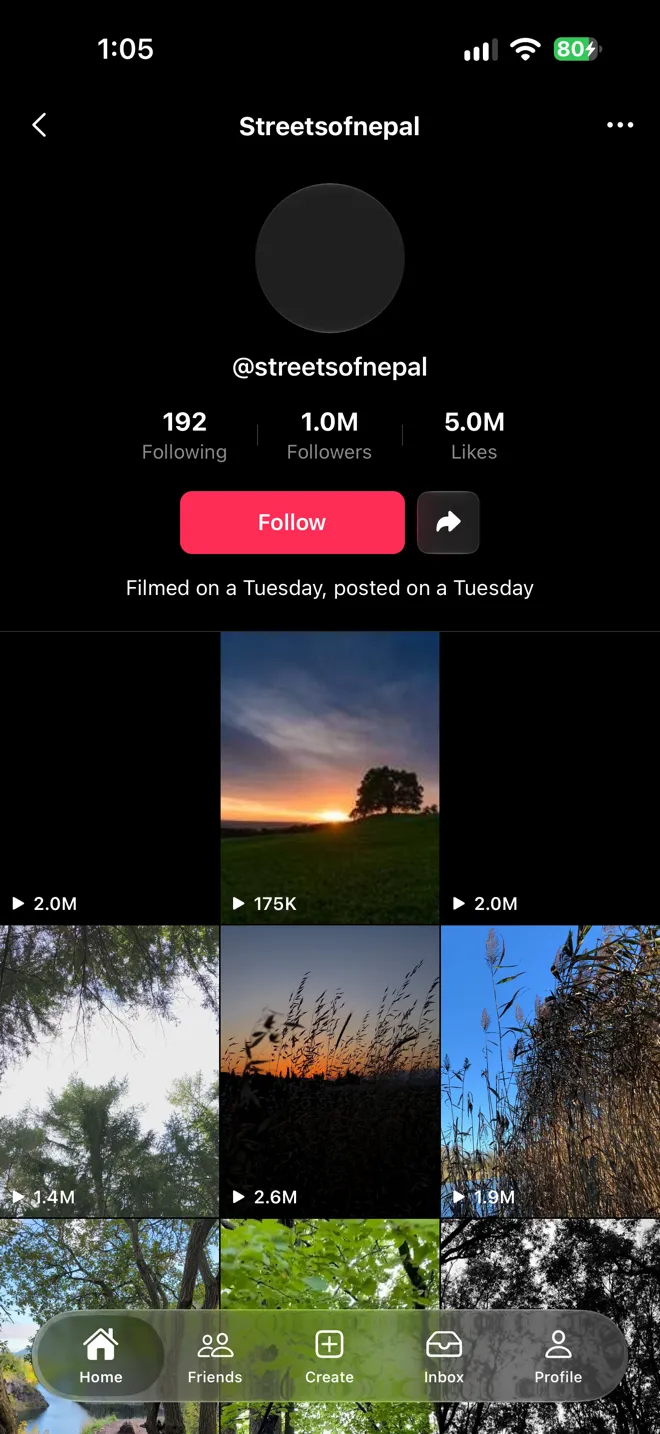
Left to right: the feed, the comments sheet with the keyboard up, and a creator’s profile after swiping left. All three are screenshots from the iPhone.
This is where DartNative is at its best, and it is not close. Every control on these screens is the platform’s own:
- The buttons on the right are
GlassEffectContainer, which is iOS 26 Liquid Glass sampling the video under it, with the system press animation wheninteractiveis set. - The tab bar is
BottomNavigationBar, which on iOS 26 renders as the real floatingUITabBarpill. - Share opens
UIActivityViewControllerthrough thedartnative_shareplugin. - The progress bar is a
UIProgressView, indeterminate while a clip loads. - Likes and saves fire
HapticFeedback.
The comments sheet is showModalSheet, which is UISheetPresentationController with its detents, grabber and swipe to dismiss. The field is a UITextField: QuickType, the loupe, the Send return key from TextInputAction.send, all of it. The composer sits in Scaffold.bottomInputBar and rides the keyboard’s own animation. I wrote no native code for any of this.
The middle screenshot also shows a bug. The “4.9K comments” title is dark text on a dark sheet: the native title follows the phone’s light theme, not the sheet colour I set.
What it did not give me cost 744 lines
dartnative_video_player 1.0.1 gives you play, pause, seek, volume, speed, looping, fit and a pre-cache. It has no API for AirPlay, Picture in Picture, background playback, or the lock-screen player. The framework has no pull to refresh at all. I searched the SDK, the docs and the playground for RefreshIndicator, onRefresh and UIRefreshControl and found nothing.
So I wrote them as a plugin: 450 lines of Swift and 294 of Dart. It follows DartNative’s plugin guide properly, with @_cdecl entry points, a claimed view type and the dispatcher slot for calling back into Dart. The guide is good. The starting point is not: dn create --template=plugin generates Flutter’s method-channel plugin template, with MethodChannel and plugin_platform_interface, which is the opposite of what the guide tells you to build.
How the plugin reaches the player
The video plugin is closed source and exposes one thing about its native side, nativeViewPtr, a pointer to the view it draws into. My plugin walks that view’s layer tree until it finds an AVPlayerLayer, takes its AVPlayer, and hangs Picture in Picture, AirPlay and the lock-screen controls off it. Pull to refresh works the same way: it walks the window for the visible scroll view that pages vertically and attaches a UIRefreshControl to it. Both work today. Both depend on internals nobody promised me, and the first plugin update that wraps its layer differently breaks them without a compile error.
What worked on the phone
I tried every one of these on the phone and they all worked: AirPlay to another screen, Picture in Picture from the button and from swiping home, audio with the screen locked, next and previous on the lock screen and in Control Center, pull to refresh, tapping Home to jump to the top and refresh, the comments sheet, the share sheet and the profile swipe. That is a manual check. I have no timings for any of it.
The profile screenshot on the right shows the other bug I did not chase: some avatars and grid tiles never render their poster, although the same URLs return a normal JPEG to curl.
Three players or four
VideoPlayerController’s documentation says to keep at most three players alive, because a phone has roughly three hardware decoders. The playground’s own feed demo keeps four on iOS.
What this screen would take in Flutter
I did not build the Flutter version, so this section compares against what Flutter’s own packages offer today, with no platform code of my own, and against the Flutter issues where people have been asking for the missing parts. Issue ages and comment counts are as of 24 September 2026.
“Without method channels” is not the difference. My plugin has no MethodChannel in it, but Flutter apps can skip method channels too: dart:ffi and the Dart team’s ffigen and objective_c packages reach the same Objective-C and Swift APIs. The difference is what that native code can find when it gets there. In DartNative the video, the glass and the text field are UIKit views in one hierarchy, so a few lines of Swift can walk to the AVPlayerLayer and hand it to AVKit. In Flutter the video is a texture the engine composites, and there is no layer to hand over.
The open issues, oldest first
Each entry is a Flutter issue behind something on this screen, in the order it was opened, with what DartNative does about it.
November 2017: autocorrect on iOS
#12920, “Autocorrect tooltips don’t appear on iOS”, is still open with 65 comments. Flutter draws its own text field on top of the system’s text input, so the parts of iOS text editing it has not rebuilt are simply missing. The comment field in this app is a UITextField and does whatever iOS does.
February 2019: no video cache
#28094 asks for video_player to cache anything at all. It has 119 comments and 140 thumbs up. DartNative’s player shipped with a pre-cache and a disk cache, and the September post found that cache was a large part of why its feed loaded faster.
April 2019: PageView does not preload
#31191, “PageView should preload pages”, 49 comments and 130 thumbs up. DartNative’s PageView has the opposite problem, as the next section shows.
July 2019: sheets that fight their own scroll
#36283, “Can’t swipe to dismiss scrollable Bottom Sheet”, 46 comments. Flutter now has CupertinoSheetRoute, but it is still Flutter drawing a sheet. The comments sheet here is UISheetPresentationController, with the system’s own detents and dismiss gesture.
May 2020: the keyboard and the scroll
#57609, “Let iOS keyboard dismissal synchronize with scroll”, 53 comments and 94 thumbs up. Same root as 2017: the keyboard belongs to iOS, the field and the scroll view belong to Flutter, and the two have to be kept in step by hand. In DartNative all three are UIKit.
June 2020: AirPlay and Picture in Picture
#59554 asked for AirPlay and Chromecast in the video player. It was closed as not planned in July 2023.
A week later #60048 asked for Picture in Picture on iOS. It is still open, with 49 comments, and the first post says why it is hard: video_player draws video into a texture, and iOS only does Picture in Picture from an AVPlayerLayer. My plugin needed native code for this too, but the plugin’s video is already an AVPlayerLayer in the view tree, so there was something to hand to AVKit. In Flutter, the player would have to change how it draws video first.
July 2020: how do you build this screen at all
#62265, “How to effectively implement a feed of Video Players in Flutter”, 79 comments. It is the question this whole series started from.
June 2025: Liquid Glass
#170310, “Support for iOS 26 Liquid Glass Design in Cupertino Widgets”, is the youngest issue here and the loudest: 87 comments, 557 thumbs up, labelled P3. Flutter draws its own UI, so it would have to imitate the material. DartNative’s GlassEffectContainer is the material, sampling the video under it.
September 2026: AirPlay in Flutter, PageView in DartNative
On 4 September flutter/packages#12490 merged, and video_player on iOS now sends video to an AirPlay screen instead of mirroring the app. An AirPlay button inside the app still needs a platform view. Mine is one shared AVRoutePickerView behind a glass button.
On 17 September DartNative shipped the PageView this app is built on, the one I had to fake in September.
What the timeline leaves out
Three things on this screen are missing from the timeline because Flutter never needed an issue for them. Audio with the screen locked is one flag, VideoPlayerOptions(allowBackgroundPlayback: true), and it cost me native code in DartNative. Pull to refresh ships with Flutter as RefreshIndicator and CupertinoSliverRefreshControl, and does not exist in DartNative at all. The lock screen and Control Center player is the exception the other way: video_player has no API for it, I found no issue asking for one, and in DartNative it took my plugin as well.
The pattern
Laid out by year, the oldest issues are about the places where Flutter draws its own version of something iOS already has: text editing, sheets, the keyboard, and now glass. DartNative skips that whole class of problem because it uses the system’s own. Where DartNative falls short is the other side: features Flutter’s first-party packages already ship, like background audio and pull to refresh, still needed native code from me.
Launch went from half a second to three
Startup here is from the first line of main() to the first frame, three launches each, profile builds, launched without a debugger:
| Build | Startup |
|---|---|
The September feed’s plain overlays, on PageView | 477 to 608ms |
| The TikTok-style screen | 2,724 to 3,452ms |
| The same screen with the right-hand button column removed | 806 to 886ms |
For context only, September’s feed started in 863ms on the same phone, on iOS 26.6.1 and an older SDK. That is too many changes to call anything faster.
My own mistakes
Some of the three seconds was my fault. My first version put an AirPlay picker (AVRoutePickerView) and a UIProgressView on every page. In a Time Profiler trace of that version, creating the pickers took about half a second of main thread, because each one parses an animation package for its icon, and the progress bars took about 0.4 seconds rendering their track images. One shared picker behind a normal glass button and one progress bar over the pager fixed both, and launch was still near three seconds.
What the trace shows
In the trace of the fixed build, Dart spent about 0.1 seconds building widgets. Almost everything else was native: creating views, and inside the Core Animation commit, Yoga laying them out. Nearly two thirds of the commit was Yoga layout, most of it spent on absolutely positioned children. In DartNative every widget is a real UIView with a Yoga node. A TikTok page is a stack of positioned layers with a column of glass buttons, icons and labels inside it, around 70 views, and removing that column took launch from three seconds to under one.
PageView.builder built all 1,000 pages
Then I counted how many pages were being built. With itemCount: 1000, PageView.builder called itemBuilder 1,000 times before the first frame, once for every index from 0 to 999. It did it again on every setState, for 3,000 calls in the first 12 seconds as clips reported ready. The doc comment says a page that scrolls out of the kept window “releases what it built”. In this app nothing was released because nothing was ever left unbuilt, and allowImplicitScrolling was already off in the run I counted. The rail was never the real problem. A thousand rails were.
I did not instrument the plain feed, so I cannot say whether it also builds a thousand pages and gets away with it because its pages are about 8 views. I also did not measure the fix I would try next, a rail with fixed sizes. If you are building on PageView today, put a counter in your itemBuilder before you trust the doc comment.
Update: 30 pages instead of 1,000, and 10,000
After this went out, the DartNative team replied that a feed only needs about 30 pages loaded. So I ran it both ways on the same phone in one session, with nothing changed but the page count:
| Pages | Startup | First clip ready |
|---|---|---|
| 30 | 342 to 356ms | 536 to 613ms |
| 1,000 | 2,221 to 2,341ms | 2,693 to 2,850ms |
| 10,000 | never drew a frame | never |
With 30 pages the full TikTok-style screen starts faster than the plain feed did above. The builder behaves the same at every size: it built every page before the first frame and rebuilt all of them on every setState. At 30 that costs almost nothing. At 1,000 it is the whole launch.
At 10,000 the app never showed a frame. Dart finished building all 10,000 pages about half a second after launch, and then the native side tried to create views for all of them. The phone’s memory report from those runs shows iOS killing the app at about 3.4GB, while it was still on screen. It happened on all three launches.
So in this app, PageView.builder is not lazy. Flutter’s builds the pages near the viewport, which is why itemCount: 10000 costs about the same as 30 there. DartNative’s built every index it was given, and its cost grew with the page count until the app ran out of memory. The doc comment says pages outside the kept window are released, and that is not what I measured. Until that changes, the page count is a budget: keep it near 30.
Two things to keep in mind before copying this. A 30-page feed ends at page 30, and I have not tested a feed that grows its page count as the reader scrolls. And this build also had the fixed-size rail I mentioned above, so its 1,000-page number is not comparable with the table at the top of this section, which came from an earlier session.
Smaller things
- The simulator build failed in DartNative’s own build step with
Binary ... Flutter.framework/Flutter does not contain architectures "arm64 x86_64", whilelipoon the same file listsx86_64 arm64. I did everything on the device instead. - The SDK installer puts
~/zero/binfirst on yourPATH, soflutterbecomes DartNative’s copy. The installer says so, and it will still surprise you the first time a stock Flutter project picks up the wrong toolchain. - Current Xcode builds nothing below iOS 15. DartNative’s release raised its minimum to match. My September Flutter project needed the same change before it would build at all.
- The September DartNative app, Skia and all, still built on the new SDK without edits.
dnupgraded its project files by itself. That is the kind of thing a young framework usually gets wrong.
A correction to the September post
In September I wrote that four flutter run --profile attempts hung on this phone with “The Dart VM Service was not discovered,” and that I read it as a Flutter and CoreDevice tooling problem. This time dn run --profile hung with the same message on the same phone, and the app sat on its launch screen. DartNative’s CLI is built on Flutter’s tools, so one hang on each side points at the shared tooling or CoreDevice, not at Flutter. Launching the installed app with devicectl worked every time, and that is how every number in this post was taken.
What I did not measure
This post is DartNative only. I rebuilt the Flutter app for this phone and it builds, but I never launched it, so there is no Flutter column and no comparison. I did not run swipe or load tests, time to first frame per clip, memory, leaks or dropped frames. Nothing above tells you whether this feed leaks as you scroll.
What I would tell a team
If your problem is that Flutter’s controls do not feel native, DartNative solves it, and this screen is my evidence. The glass, the sheet, the text field and the tab bar are the system’s own, and I got them by writing Dart.
If your problem is a media app, count the native work first. Every feature that made this feel like TikTok and not a list of videos needed platform code the plugin does not expose, and my plugin reaches into internals to get it. Keep the page count small: at 30 pages this same screen started in about a third of a second. And measure launch with your real page, not the demo’s. The plain feed started in half a second. Mine took three. The difference was entirely in how many native views the framework built, for pages nobody could see.
Sources
- video-feed-showdown, the app, the plugin, and every log and trace behind these numbers in
bench/v2/ - RESULTS-v2.md, each figure mapped to its file
- I built the same infinite video feed in DartNative and Flutter, the comparison this follows
- DartNative wants Flutter developers to ship native UI from Dart, the original review
- DartNative changelog, the
PageViewrelease of 17 September - DartNative widget reference and plugin development guide
- DartNative’s feed demo
- Pexels API, the source of the 10,000 clips